Monday, July 31, 2006

Academic Aesthetic Podcast 89

Click to listenLately I seem to have been bitten by the DIY bug.
DIY, for the uninitiated, stands for "Do It Yourself" - mostly because DIY enthusiasts would much rather put their own embellishments on everything they touch.

And with the internet it's easy to find plans for hundreds of DIY projects - from using a soda bottle and some kitchen supplies to make an effective mosquito trap to attaching some remote control servos and a digital camera to a kite for some sweet arial photography.

The great thing about DIY is the wide variety of projects. You can pick something to do that's as easy or as difficult as you want, and if you're unhappy with the plans you're given you can always modify them to see what happens.

I've been making my own t-shirts and web sites for over a decade now, but recently I've started branching out by creating handmade business cards, and most recently a wallet out of duct tape. (My next project will be a camera bag.)

Of course the spirit of DIY can be taken to school as well. For example:

After a Language Arts project where you have the students form groups to write their own stories, you can have them type them into PowerPoint to illustrate them and even record themselves narrating the tales. Instant zero-cost publishing!

Have the students use PowerPoint or any one of a number of programs that allows for visual design, and print the finished product on a t-shirt. Admittedly there is a bit of a cost for this, but if you shop around at office supply stores you should be able to get iron-on transfers for around $1 a sheet.

How about an analog example: Want to make a quick and easy seating chart? Use a sheet of posterboard and some post-it notes. Any time you move the desks around you can just move the notes. (And if you leave these babies on your desk you won't have to deal with substitutes saying "Well I couldn't find your seating chart!")

There are also a few online enterprises that are more than happy to make your DIY experience a little easier:
  • Makezine.com - more DIY ideas than you can shake a stick at.
  • Instructables.com - from the makers of Makezine.com, these are user submitted DIY tutorials.
  • Google Pages or WikiSpaces - make your own website for free.
  • Lulu.com - publish your own book, for school or yourself.
  • OriginalWorks.com - Students can have their artworks placed on a variety of products and have them made to order as a school fundraiser.


Hear yourself on my upcoming 100th podcast spectacular! Just click here and your web browser will use your computer's microphone to send me an audio comment.

I'll accept just about anything, including simple greetings or congratulations, shout-outs, reviews of products or services, commentary on recent events, or even plugs for other podcasts.

This is, of course, provided everything is kid-safe.

Think of it as free advertising that will reach an exclusive listener base. And yes, by "exclusive" I mean "small."

Friday, July 28, 2006

Academic Aesthetic Podcast 88

Today I'd like to talk about a little thing the art community calls "Form vs. Function," and relate it to education in general.

An item's function, as we all know, is what it does - what it's purpose is. Form, on the other hand, is what it looks like. Both can be equally important, but not always.

Take the chairs in a classroom, for example. Sure, they were designed by someone, but at the end of the day their main purpose is to lift the students high enough off of the floor so they can use their desks. Their color was most likely determined by whatever was cheapest or easiest.

On the other hand, a painting puts much more weight on it's form. In fact, it's form is so important that looking nice is also it's function. (This is, of course, assuming it's not there to cover the spaghetti stain your three year old managed to put on the wall.)

Think that since you're not an artist this doesn't apply to you? Think again. When's the last time you sat through a workshop filled with pertinent information, but was still so dry in it's presentation that you remembered nothing afterwards? Or maybe the PowerPoint slides looked nice but added nothing to what the speaker was saying?

As a traveling art teacher I've seen a lot of classrooms, and I've seen far too many teachers who put the function of teaching so far ahead of the form of teaching that student retention is almost nil.

I could just tell the students what they need to know, give them a test, and move on, but how many of them would really learn?

No, like a well designed car I need to both get the students there and ... well ... look good doing it.

As those of you who are teachers get ready for the new school year, I want you to think about how you can balance form and function in your lessons. Will your desks be arranged in the same boring grid, or will you break it up a bit? What posters will you have on your walls? (If you don't have enough posters, have your students make some that tie in with your curriculum.)

What will your class website look like?

And there's more to it than just how your room appears. When you're presenting your lesson, will you be hiding behind a podium or moving about the room as if it was your own personal stage? More activity shows you have more interest in the subject, and while that doesn't necessarily make sure the students will learn, just try to teach them the same thing if they think that even you aren't interested in long division.

In other news, I'm thinking about playing some audio clips on my 100th podcast which I should reach sometime in late August, provided I don't get sidetracked somehow. I've decided to accept just about anything, including simple greetings or congratulations, shout-outs, reviews of products or services, commentary on recent events, or even plugs for other podcasts.

This is, of course, provided everything is kid-safe.

Think of it as free advertising that will reach an exclusive listener base. And yes, by "exclusive" I mean "small."

If you want something played during my 100th podcast, record it and send it to me. I'd prefer it to be in MP3 format, but I'll accept other file formats if they're not too large.

Wednesday, July 26, 2006

Academic Aesthetic Podcast 87

In this podcast I talk about my "Don't L.A.F." policy and come up with an idea for my 100th podcast.

Yesterday I was browsing my Furl links when I noticed a blog I had bookmarked but hadn't subscribed to in over a year. Wondering how things had changed, I clicked away ...

And immediately hit the back button and deleted the link.

Apparently some time in the past year a blog about a teacher's experiences in school had been replaced by something a little less kid friendly. I was shocked and appalled, partially because an educational blog had been corrupted like that, but more so because since all of my Furl links are public I had been linking to that garbage for I don't know how long.

Of course there's a moral to this upsetting story - a lot of us tend to L.A.F. (that's short for Link And Forget), thinking that those sites will stay the same forever. They don't. Sites get redesigned, repurposed, redirected, or simply disappear. If you use a social networking service like Furl or del.icio.us it's your responsibility to go through your archive every now and then and separate the good apples from the ones that have long since turned to compost.

It might take a while, but it's worth it and you might just rediscover a site or two that you'd forgotten.

In other news, I'm thinking about playing some audio clips on my 100th podcast which I should reach sometime in late August, provided I don't get sidetracked somehow. I've decided to accept just about anything, including simple greetings or congratulations, shout-outs, reviews of products or services, commentary on recent events, or even plugs for other podcasts.

This is, of course, provided everything is kid-safe.

Think of it as free advertising that will reach an exclusive listener base. And yes, by "exclusive" I mean "small."

If you want something played during my 100th podcast, record it and send it to me. I'd prefer it to be in MP3 format, but I'll accept other file formats if they're not too large.

Tuesday, July 25, 2006

DOPA Alert!

Swiped from Will Richardson, who in turn swiped it from David Warlick:

ALAWON: American Library Association Washington Office Newsline

Volume 15, Number 73

July 25, 2006

In This Issue: URGENT ACTION ALERT: Call Representatives TODAY and ask them to oppose DOPA

URGENT Action Needed:

The Washington Office has learned that the House may try to expedite
passage of H.R. 5319, the Deleting Online Predators Act (DOPA),
TOMORROW, July 26th.

PLEASE CALL YOUR REPRESENTATIVES TODAY and ask that they oppose HR 5319. Capitol Switchboard number is: 202-224-3121.

Background:

DOPA is sponsored by Rep. Fitzpatrick (R-PA) and supported by the
House Republican Suburban Caucus. It would require that, as a condition
of receiving E-Rate support, all schools and libraries block access to
social networking websites and chat rooms.

The bill raises a number of issues:

1) Local school districts and libraries should determine what
content should flow into schools and libraries. Federal mandate over
content control is very problematic.

2) Districts and libraries already have the power to block access to
social networking sites and chat rooms and a number of them have
already done so.

3) DOPA imposes yet another burden on schools and libraries
participating in the E-rate and may deter many from continuing to
participate.

4) This bill paints an unflattering and distorted view of the Internet
as a whole, serving to scare away parents, students, teachers and
librarians from making use of all its resources.

Last week, YALSA Executive Director Beth Yoke testified on DOPA
before the House Subcommittee on Telecommunications and the Internet on
DOPA. You can read her testimony here:http://www.ala.org/ala/washoff/WOissues/techinttele/DOPA_testimony.pdf.

Monday, July 24, 2006

Academic Aesthetic Podcast 86

Steve, this is all your fault.

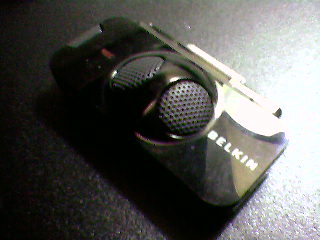
Back when I was interviewing Steve Dembo he mentioned that they had finally come out with a microphone for the video iPod. I thought I could just file that information away, but no.

Instead, knowledge of the Belkin TuneTalk Stereo nagged at me for over a week. On Friday when I went to the Apple Store to buy a new laptop battery I was greeted by multiple rows of the shiny black marvels, and as I'm easily distracted by shiny things I really had no choice but to get the battery AND the microphone.

Rather than keep this just another story about an expensive impulse purchase, I've decided to turn it into a review of the very same device. You may have noticed a difference in the sound quality for this podcast. That's because while I recorded the introduction with my tried and true USB mic, the rest of this is being done with the TuneTalk. You know how it is when you get a new toy - you use any excuse to try it out!

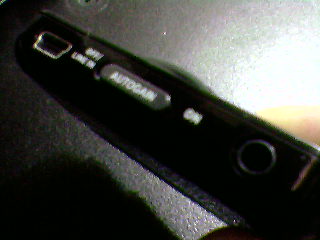
The first thing I noticed when I opened the box was that there was a USB cord in there. The TuneTalk has a standard sized USB port on the bottom of it, so I can sync and charge my iPod without removing the TuneTalk. That'll come in handy if I ever loose one or both of my iPod cables, but more importantly it lets me charge the iPod while I'm recording. If you've ever watched video on an iPod you know how fast that battery can drain when it's spinning the hard drive at full speed, and recording audio appears to be no different in terms of energy consumption.

It's possible to open the case without lacerating myself, and with my precious TuneTalk in my hand I noticed that it felt ... well ... cheap.

An iPod itself is a marvel of molded plastic and metal, and despite it's size it has a weight to it that lets you know Apple didn't skimp on the components. The $70 TuneTalk (less, with the education discount) is as light as a feather, making me wonder just how thick that plastic really is. Still, I guess if you keep in mind that it has to hold onto the iPod by the very connection that sends all of the data and power you don't want it to be too heavy.

I did a couple test recordings immediately, with and without the gain switch turned on. (The gain switch, by the way, can be adjusted depending on if you're in a noisy or quiet environment so that it can pick up your voice better.) It's possible to go through the menu features of the iPod to turn recording on and off, but this seems like a waste of time since there's a convenient button on the left side of the TuneTalk that takes you to the record screen right away. I love that feature.

I also noticed that it had a line in jack for recording audio from an external microphone or other device, although the manual said that using the line in jack turns the internal mic off. Visions of splicing my laptop's audio output with an external mic to do real time mixing came to mind, but as I'd have to buy more stuff to see if that would work I'll save that experiment for another day.

Test recordings done, I synced up using the included USB cable rather than unplugging the TuneTalk. I was surprised to see that iSync didn't load when I plugged it in, but everything else synchronized just fine. The recordings I made showed up in a playlist labeled "Voice Memos," but they were also grabbed by some of my Smart Playlists. I'll have to adjust them later so the next time I'm playing Civilization I won't have to stop conquering Europe to fast forward past a grocery list when all I wanted was some mood music.

I took a look at the test files and noticed that they were in fact quite large. I've recorded on portable devices before, but they always saved the audio as 4 bit WAV files - not exactly the most space demanding of formats. Belkin wasn't kidding when they said it recorded CD quality audio. A twelve second recording at high quality was over 2 MB! Sure, I can go through my iPod's menu and switch to low quality, but right now I've got 10 GB of free space on that little hard drive so I'm not too worried about it at the moment. I can always compress everything in GarageBand afterwards.

The last thing I'd like to bring up is that the TuneTalk does in fact record stereo. I've heard more than one podcaster get ahold of a stereo microphone and rave about it, but as I usually compress my podcasts into mono to save space I'm ambivalent about it. I suppose it could come in handy if I was trying to record multiple people, as the listeners would be able to tell the speakers apart by their locations. I want to do more interviews this school year, so this might actually come in handy.

Ok, let's wrap this up here. Believe it or not I'm actually happy with the TuneTalk, mostly because in spite of it's aforementioned flaws it's very convenient and makes a very nice quality recording. That said, it's not for everyone.

If you want a portable recording device and you're on a tight budget, just set up a free account through audioblogger.com or one of the other services that allows you to record through a phone conversation.

If you've got $40-$100 to spend but don't have a video iPod, check out Creative's line of MP3 players. I used to use a 1 GB Creative MuVo to record most of my podcasts, and it worked just fine. (You can also get it in other sizes.) I've also heard some very good things about the Creative Nano, which is more or less the same device with a different case design.

But if you DO have a video iPod and you want to turn it into a portable recording device, get your hands on a TuneTalk. The boost in recording quality alone is worth it.

Friday, July 21, 2006

Academic Aesthetic Podcast 85

In today's podcast I review eyespot, a web based video editor.

Sometimes I plan a podcast topic for days before I record it, other times I throw out that hard work in favor of an idea that strikes me at the last minute. Take yesterday, for example...

A member of last year's Art Club has been planning on starting his own podcast, and over the past couple of weeks we've been trading emails and IMs on the subject. Yesterday he was very interested in video editing, but unfortunately he doesn't own a Mac so my favorite program (iMovie) won't run on his system. I suppose he could use MovieMaker, but I've never been a big fan of the Windows Media format.

Fortunately there are a few editing programs out there that are totally free. One of them is jahshaka, an open source cross platform program that claims to be "Powering the New Holywood." Oddly enough I've never tried it out, but if anyone out there has then please let me know how well it works.

There are also a couple web based solutions. That's right, you can edit video with a web site. Thank you, Flash and Ajax.

Eyespot and Jumpcut are both sites that cater to the video editing community, and I've heard good things about both, although yesterday I only had time to play around with eyespot.

Eyespot has in my opinion only three drawbacks. The first is that they display the most recent videos on their frontpage. For most of us that doesn't matter, but if I want to show it off to my students I'll have to do some explaining if a certain genre of video appears for all to see. This is in fact the only issue that will keep me from using it with my students.

The other two problems are more technical in nature. While there doesn't seem to be a limit to the number of clips you can upload, you can't upload anything larger than 50 MB. That's a huge file if you're talking about .mp3s or .JPGs (both of which can also be uploaded), but I have a 10 minute .AVI I made with my camera that ended up over 140 MB. I actually had to use a free program called MoviesForMyPod to compress it into a more uploadable file format.

The last problem I encountered was a lack of features. There are few transitions to choose from, and while you can create a title screen the default text is small and uninspiring.

Still, one has to remember this is a free service. In spite of all of these issues I had fun using eyespot. It edited my video faster than I could have done on my own computer, I was able to download the finished product to my hard drive, and it was even iPod compatible.

If you want to hear an interview with one of the big wigs at eyespot you can check out this podcast by Amber MacArthur.

Thursday, July 20, 2006

Mini Lesson 7: Origami Water Bomb

I love origami, so whenever I need an idea for one of my mini lesson videos I tend to lean towards that first. Lucky for me I know a lot of designs that are public domain!

I tried something new with this episode. Instead of using iMovie I tried out eyespot.com. It's not as feature rich as iMovie, but it does a decent job and even allows you to export video for video iPods. Nice.

This is the second of two lessons that I recorded at the DEN North East Regional Institute. It has nothing to do with the DEN other than that.


Download it here.